
Last Asylum Plague Account
Your Last Asylum: Plague account is a login such as Facebook, Google, Game Center or email that holds your character, and you manage it from the User Center in your settings. Bind it once so progress survives a lost phone, then use the same menu to switch accounts, change characters and find Delete Account. This page lists each step with the wording the game uses.
Where to Find What
Every account task sits in one of a few windows. The table gives the menu path for each task, and the sections below walk through the steps.
| What you need | Where in the game | Good to know |
|---|---|---|
| Check that the account is safe | Profile icon › Settings › Account | The Account Status line reads Safe or Unsafe. Aim for Safe on day one. |
| Bind an account | Profile icon › Settings › Account › User Center › Account Binding | The window lists email, Facebook and Google Play. A row reads Bind until it is linked and Bound after. |
| Sign in on another device or on PC | Login screen | Use the login you bound. Facebook, Game Center and Google Play each keep their own save. |
| Switch account | User Center › Switch Account | The game asks you to confirm the log out and then shows the login screen again. |
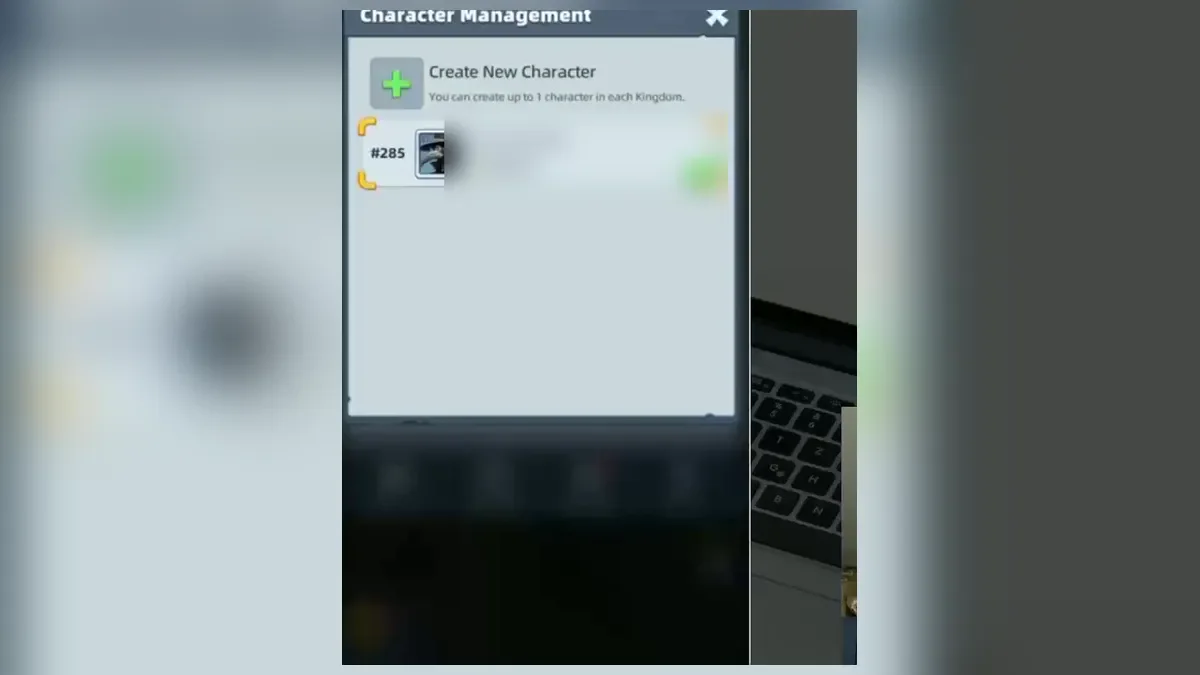
| Start a character in another Kingdom | Character Management › Create New Character | You can have 1 character per Kingdom. The new city starts from zero. |
| Change nickname or avatar | Tap your avatar, nickname menu; Change Avatar | A nickname has 3 to 16 characters. Custom avatars unlock at Sanctuary Lv.25 or with the 1st Top Up Pack, and each upload goes into review. |
| Delete the account | User Center › Delete Account | Treat it as final: the game gives no recovery step. |
How to Bind Your Account
A new character starts as a guest. The game keeps its progress on that device only, and the Account Settings window says plainly that progress on an unbound account can be easily lost. The same window shows an Account Status line with two possible values, Safe and Unsafe. Aim for Safe on day one.
- Tap your profile icon in the top left corner, then open Settings and the Account tab.
- Check the Account Settings window. It lists your account, your nickname with the Kingdom number, your Territory Level and the Account Status.
- Open the User Center and choose Account Binding.
- The binding window shows three rows: email, Facebook and Google Play. Each row reads Bind until it is linked and Bound after.
- Pick one and sign in. When the link works, the game confirms with a message such as "Facebook account linked" or "Google account linked".
On iPhone the game also supports Game Center, and its messages mention that each platform account keeps a separate save. Facebook, Game Center and Google Play each hold their own progress, so always sign in with the same login on a new device. A Facebook account that is already linked to another guest account cannot be linked a second time, and the game shows an error that says so.
Binding Reward
The Bind for Reward event appears in the special events tab once your Sanctuary reaches level 6, and it stays there until you bind. After you claim it, the game answers with "Account binding reward already claimed" if you try again. The reward changes by version, so read the window instead of trusting a number. The Sanctuary page shows what else opens at level 6, and the codes page covers other free rewards.
Switch Account or Character
The User Center has a Switch Account button. It logs you out, which the game confirms with the question "Do you want to log out?", and then shows the login screen again. From there you sign in to a different login. If you pick Facebook or Google that was never linked, the game answers "Unable to switch: Facebook account not linked" (or the Google version), so bind first.
Characters live under Character Management. The window shows your characters with their Kingdom numbers and might, a Create New Character button and the rule that you can have up to 1 character in each Kingdom. Choose a character and tap Tap to Log In to enter it.
- When you create a character, the Kingdom list is split into number ranges, and one range is marked Recommend.
- Each Kingdom carries a tag, Smooth in green or Popular in red.
- The confirmation reads "Enter this Kingdom and create a new character? You can switch characters later in Character Management."
- A Kingdom that entered a new era shows "You may not create new characters."
Each Kingdom is a separate world, so a new character begins from scratch. Your old city stays in its Kingdom. The servers page explains how Kingdoms work and how to choose one.
How to Unbind Account
The game includes confirmations for both "Facebook account unlinked" and "Unlinked Google account", so removing a link is a normal feature. Use the same Account Binding window and tap the row that shows Bound. Two limits matter before you do it.
- Do not unbind your only login. The status would return to Unsafe, and the character would depend on one device again.
- To move a character, link the new login first, test that it opens the right character, and only then remove the old one.
If an unlink fails, the game shows "Failed to unlink Facebook account" or the Google version. Wait a minute and try again with a stable connection. If it keeps failing, contact support from the profile icon, Settings and Help.
Delete Account
The User Center list has a Delete Account entry beside Switch Account, Account Binding, Contact Us, Terms and Conditions and a one-time password block. That entry is the official route. The game does not describe what happens after you confirm, and it never says whether a deleted account can come back. Treat the action as final and do it only when you are sure.
Nothing in the game text lets you delete one character and keep the others, so ask support first if that is your goal. For personal data requests, the official privacy policy of the game publisher is the place to read the rules. Our own privacy policy only covers this website.
Change Name and Avatar
Tap your avatar and open the nickname menu to edit your name. A nickname must contain 3 to 16 characters. You can also upload a custom avatar from your album or camera. Each upload goes through a review, the status shows Under Review, and you cannot upload another one within 1 hour of a submission. The game removes avatars with violent, adult, political or abusive content, and repeated violations disable the custom avatar feature.
Play on PC
The login screen carries a notice: "To protect your account and character, please create your character on the mobile app before logging in." In practice, start on your phone, bind a login, and then sign in with the same login on PC. The PC page shows the setup, and the download section on the home page lists the official stores.
Account Trading Risks
The game does not offer account sales, and its own mail tells players to stay away from them. The Secure Your Account message says some players share personal social accounts or sell in-game resources in chat, and it asks doctors not to add strangers. It also states that packs have official prices and that the only authorized way to buy Diamonds is through your own account in the game. A second mail warns about unofficial communities and fake alliance leaders who ask for private contacts.
Play your own account and grow it with free rewards from the beginner guide. The official website page lists the channels that announce changes. If the game shows a ban or a login failure, the login and ban messages explain each text and the support route.
Frequently Asked Questions
How do I delete my Last Asylum account?
Open your profile, go to Settings and Account, then open the User Center. The list there includes a Delete Account entry, which is the official route. The game does not explain whether a deleted account can be restored, so treat deletion as permanent. If you only want a fresh start, create a new character on another Kingdom instead.
How do I unbind a Facebook or Google account?
The game has messages for unlinking both Facebook and Google, so unbinding is supported. Open the Account Binding window from the User Center and tap the linked row. Bind a different login first if you want to keep your progress, because an account with no binding can be lost with the phone, as the game itself warns.
Can I have more than one character?
Yes, but only one per Kingdom. Under Character Management you can tap Create New Character, pick a Kingdom and confirm. Your old city stays where it is. The new character starts from zero, and items such as bought heroes or skins stay with the character that received them. Details on Kingdoms are on the servers page.
Why does the game say my account is unsafe?
The Account Settings window shows an Account Status of Safe or Unsafe. Unsafe sits next to the game warning that progress on an unbound account can be easily lost, so bind a login to fix it. Use the User Center to bind Facebook, Google, Game Center or an email login. Binding also unlocks the binding reward.
Is it safe to buy or sell a Last Asylum account?
No. The game sends a mail called Secure Your Account that warns players about strangers selling resources and asking for social contacts. It says the only authorized way to buy Diamonds is through your own account in the game. Giving your login to another person risks losing the account and everything on it.